FlexSC: Flexible System Call Scheduling
Reference: FlexSC_Flexible_System_Call_Scheduling_with_Exception-Less_System_Calls
To just read ONE go of this, to get a just of what is happening, read the Last Section: ALL in ONE
Motivation:
Synchronous syscalls waste a lot of cycles. Thus to reduce this overhead, the paper proposes exception-less syscalls that decouple invocation & execution of syscalls.
Idea
Decoupling invocation & execution of syscalls. This way you can
- schedule syscalls to reduce waits & increase temporal locality.
- Execute syscalls on separate cores independently, resulting in better spatial per-core locality.
Syscalls are expensive?
One primary time taker - mode switch time (USER ↔ kernel)
- Pollution: Replacement of state/instruction of userland by kernel mode.
Ideally, user-mode IPC (intra per-cycle) should not decrease one work syscalls.
Direct Cost: The processor exception associated with syscall has to flush the processor pipeline.
Indirect Cost: Syscalls pollution on the processor structure.
Exception-less syscalls
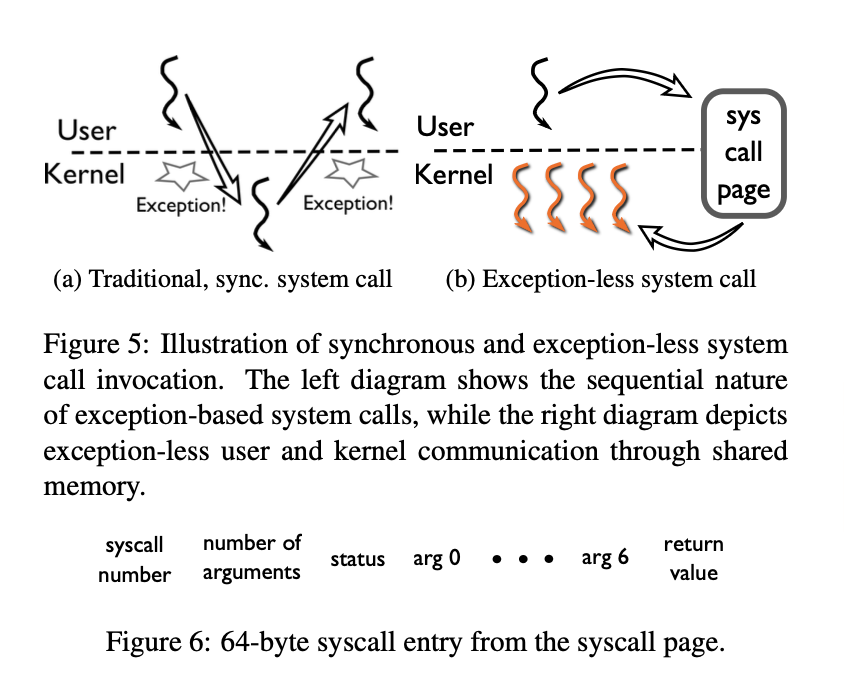
Mechanism to request kernel services that don't use synchronous processor exception.
We could do
Syscall batching
Delay execution of syscalls, batch them & execute them in batches
minimizes frequency of switching b/w modes
improves temporal locality
Core specialization
Schedule on one core & execution on others
this improves spatial locality & throughput
fixed costs are also reduced since very few switches
Exception vs Interrupt
| Type | Source | Timing |
|---|---|---|
| Exception | inside kernel (OS) | synchronous |
| Interrupt | outside source | asynchronous |
Interface
It contains syscall pages which is a set of memory pages shared b/w user & kernel mode. An entry contains syscall number, arguments, request status and return value.
Invocation: Original syscall vs New
Original Syscall
- Application system issues a machine instruction to issue an exception
- CPU traps, mode switch
- Push registers, args, etc. to kernel stack to return back properly.
Now, newer syscall invocation
- User-space thread writes to the entry on syscall page, writes its request
- Continues user execution without stopping/interruption
- Then it must verify completion
- Issue a verify doesn’t cause exception
Syscall page
A syscall page is local to a core. A core is assigned Multiple Syscall Pages. For any entry, it could have status:
- free (a new request can be posted)
- submitted (application ready to go)
- busy (syscall working on core)
- done (process ready to resume)
Execution of syscalls
New syscall-threads are made which only run in kernel mode. They take a syscall from entry & run it on behalf of user process.
Benefits:
- better flexibility in scheduling
- can be run on different cores representing I/O requests
- they may delay the execution of syscall till resources are available
- they can run on diff cores with communication only, avoiding expense of mode switches
Syscall Threads
Unlike exception-based system calls, the exception-less system call interface does not result in an explicit kernel notification, nor does it provide an execution stack. To support decoupled system call execution, we use a special type of kernel thread, which we call syscall thread. Syscall threads always execute in kernel mode, and their sole purpose is to pull requests from syscall pages and execute them on behalf of the user-space thread.
Syscall threads can be scheduled on a different processor core than that of the user-space thread, allowing for spatial locality of execution.
FlexSC - Library
Has 2 new registers —
flexsc_register(): used by process which wishes to use exception-less syscall- It is itself exception-based (to avoid complexity)
- needs to be run only once to register the process.
It does 2 things:
- Save syscall page in user-space of the process
- spawn one syscall thread/entry for the syscall page Hence for a registered process, it creates empty sleeping syscalls threads be default which will wake up when a syscall entry exists.
flexsc_wait()(again it itself is exception-based)- waiting of a syscall when user process waits
- without which it is stuck; it seems easy
- above syscall to fetch the result from kernel & get sleep
- when flexsc_wait returns, it wakes up the user thread
Syscall Thread Actual Execution
- The virtual address space in which syscall execution occurs is the kernel address space of the core processor.
- The current thread context can be used to block execution should it be necessary (resource not available).
- Where are they run? Ans: in the Virtual Address(VA) space of the main process using clone.
- Problem 2: If 1 thread, then what do we do when resource not available? too much wait is bad. Ans: Ideally thread should run without ever sleeping. But to arrange for resources (without changing syscall code) is to create a syscall thread/entity. We create a thread per entry of syscall page
Pros / Cons of thread/entry
| Pros | Cons |
|---|---|
| - Worst case where every syscall blocks execution is taken care of. | - seems expensive but this is a kernel thread with back-up thread & small stack (10 KB from max) |
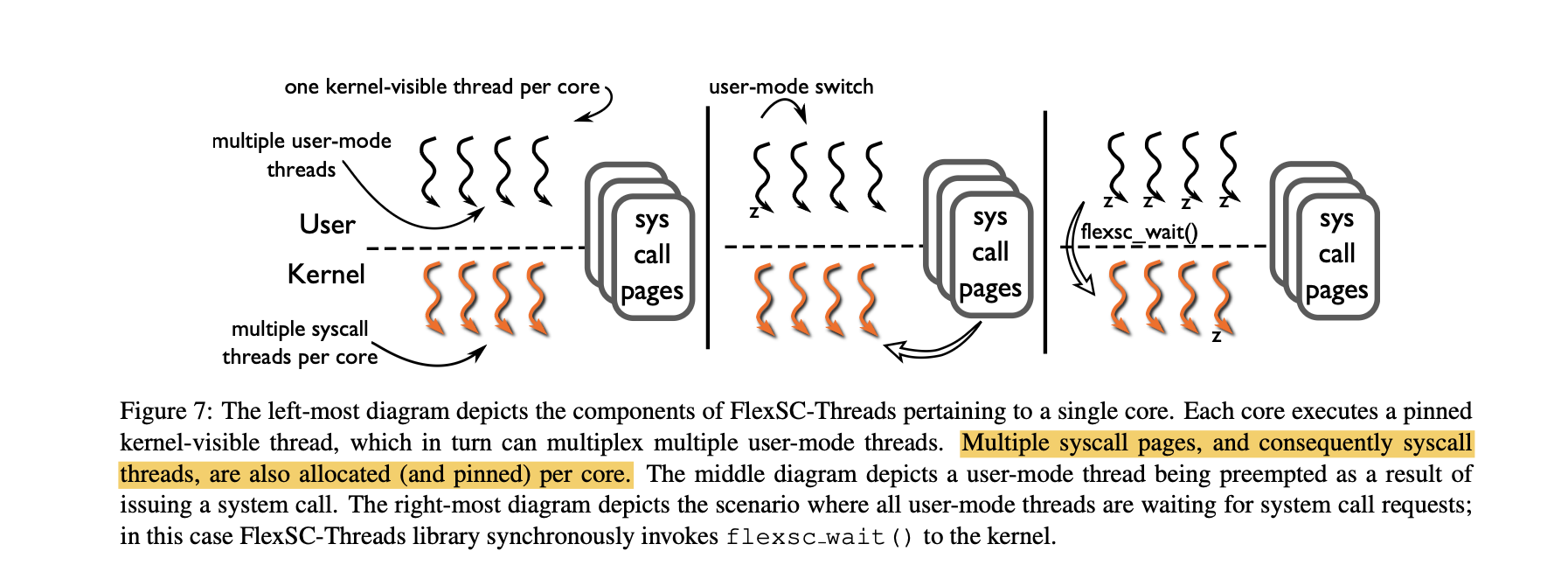
For 1 core, only 1 thread executes at a time(FlexSC_Thread) which is visible. Scheduling is done properly by the FlexSC_Thread on user theads & syscall threads.
Scheduler for syscall threads
- For 1 core: when the process (main) is stuck, syscall is over new processor (flexsc_wait). Now all syscall threads are run in order of arrival of syscalls (at that processor) it doesn’t return to user process
If syscall blocks (meaning it has to go fetch from memory, disk), then another thread is run till finish/blocks. If all threads are done/blocked, only then main thread is run.
Benefit of grouping: minimize switching (kernel mode switch)
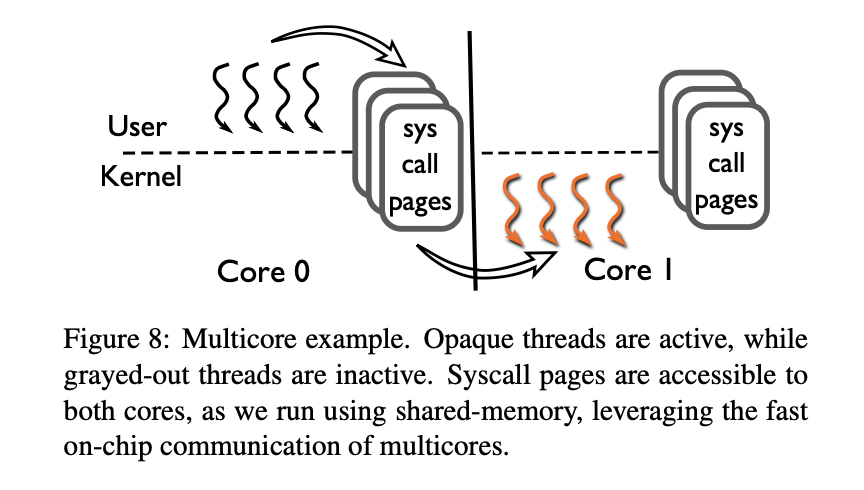
- For multicore: the syscall threads use the same address space as main user-space. Given the list of available cores, if one core is blocked, the others choose a syscall thread to run on the main process VA space, this is done using “inter-processor interrupt” sent to the remote core, signalling it must wake a syscall thread.
Now for 2 threads running on different core, Case 1: if they access 2 different page table entries (memory), then the page table entries are locked, because there exists finegrained locking mechanism on pagetable,. Case 2: But if they want to access the same page, then one process must wait. Case 1 is faster because it parallelizes the execution of syscall threads and Case 2 mimics the the core 1 Case but with reduced context switch cost and only an interrupt to wake the other syscall thread on unlocking the page table entry.
Programming Paradigms
Programming with exception-less system calls directly is more complex than using synchronous system calls, as asynchronous syscalls can make debugging inconvenient.
FlexSC-threads
- Built for server-type applications with many user-mode threads
- It is a threading package that transforms legacy synchronous syscalls into exception-less ones transparently
- Linux multi-threaded programs work out of the box since it’s Library is used in FlexSC implementation itself.
It follows the below threading model to have an optimized resource management and speed, for all syscall threads made.
M-on-N threading model
There exists one kernel thread for each core. This kernel thread is visible to the OS Schedule. This is called the FlexSC-thread a.k.a the “puppeteer”. Now, the FlexSC_Thread has 2 functionalities. -
- Acting as a middleman b/w syscall page & user thread
- Scheduler among user threads
1. Middleman
A user process thread wants to call 4 syscalls, till it can’t move ahead (since it might need data from a syscall). So it issues 4 syscall entries to the syscall page. But the user process thread doesn’t write. FlexSC-thread takes the syscall & write’s on the syscall page in separate entries & wakes up the sleeping thread for that entry. The FlexSC-thread acts like an “Acknowledger” that says - “Yes, I have received your syscall, please continue your jobs”.
This prevents the user thread to wait till syscall completes.
2. Scheduler (Properties)
Once a syscall is given to FlexSC-page, it stops the thread A & runs thread B.
FlexSC thread has control over task threads which are user threads A & B, etc. These task threads are not visible to the OS Scheduler and only the FlexSC_Thread is visible to the OS Scheduler.
Once a syscall is done (on any other core), the syscall thread itself writes onto the syscall page it is done. All task A & B are flexsc_registered. These aren’t independently spawned processes.
— Eg: You have a parent Apache server running on a core. It calls the FlexSC library, which registers it as a FlexSC process. Now any software thread it creates gets registered too by the library. The syscalls that they call are the ones written on syscall page.
For any random (say) python script independent of this Apache server, it is not registered. It is in the hands of the OS scheduler now instead of the FlexSC_Thread scheduling. But the threads in FlexSC model are in the hands of the FlexSC thread as scheduler.
This is called “M-on-N” thread scheduling, Where there are N kernels with each visible thread and M user threads on each of the N.
ALL IN ONE
This is a full example based description in human word to understand this model in 1 go!
We have a code of form:
-- Process A's syscall's. Note: args are missing,
-- output of one syscall can possibly be input to another.
syscall_1();
... SOME simpler instructions are executed
syscall_2();
... Some simpler instructions are executed
syscall_3();
syscall_4(); -- needs data from syscall_2 and hence can't proceed further.
We have a Parent Process P which is flexsc_registered . How? By calling the Library FlexSC in its source code. This process is now in the hands of FlexSC and all its sub threads(by this I donot mean syscall_threads).
This parent Process P creates some user threads(sub task threads, say for server-client usages). I name 2 of these as A and B. Now, Process A has to issue syscalls as mentioned in the code above, but can’t issue the 4th one since it needs data from syscall_2. How does it do it?
The FlexSC library creates a visible FlexSC_thread , say FP, under which P falls and all its children falls too(like A and B). This FP is visible to the OS Scheduler and hence “kernel visible thread”. This thread has 2 jobs, one is to write to syscall page and give back info to user thread. Another is to schedule A and B. The syscall_thread's are scheduled by OS Scheduler to help scheduling on another core.
What is syscall_page and syscall_thread? Simply, multiple memory pages are allocated per kernel where syscall_entry is made for each syscall. So A issues syscalls which FP acknowledges and says “Yes, you have done your job, continue ahead” and FP writes to syscall_page and updates 1st entry. Similarly it writes all 3 entries and wakes up a syscall_thread for this entry (Note that only one syscall thread is active per core at a time, and it loops to process the whole batch). Each entry has a corresponding unique syscall_thread which is created on creation on syscall_page and is sleeping till it gets an entry to work on. These threads are a clone of user thread A and run in the virtual address space of A, but possibly on a different core.Because the page belongs only to that specific Core's FP, the FP can write to it without using locks (atomic instructions). This makes submission incredibly fast.
Now once A issues 3, it needs to wait and hence sleeps. The FlexSC scheduler runs the 3 threads in that core or in a different core for availability(intercore signalling is done by inter-process interrupt. Once the syscall is done, it itself writes to the syscall page and marked it DONE with output there. The FP sees it and interrupts A to wake up, gives the outputs of syscall and it continues.
Now, when does B run? Well, A doesn’t get to issue syscall_2 just after syscall_1, FP schedules process B to run and let it issue anything it wants. The same process is carry forwaded, and then A is run again(or any other process). So basically, you will see A’s entry, then B’s entry, some other process C’s entry, etc. and the come back to A for a possibly new entry.
Now, what if all User Tasks (A and B) are stuck waiting for data? The library issues then a flexsc_wait() where the FP puts itself to sleep until a syscall is completed.
When a syscall request is posted, the FlexSC Scheduler (inside the kernel) has to pick a core to run the worker thread. It uses a strategy called Core Specialization. The scheduler maintains a predetermined “Preferred List” , static list of cores that are "allowed" to run syscalls for this process. When a syscall request is posted, the FlexSC Scheduler (inside the kernel) has to pick a core to run the worker thread. It uses a strategy called Core Specialization.
The logic with which it selects is - The Selection Logic (Round-Robin-ish). It looks at the First Core on the list. It checks if this core currently running a Syscall Thread for this process? If YES (Busy): It skips it and checks the Next Core on the list. If NO (Free): It selects this core as the target.
If the selected core is sleeping (idle), the kernel sends an Inter-Processor Interrupt (IPI) to that remote core and signals "Hey, wake up! There is work on the syscall_page." The syscall_thread on that remote core wakes up, locks the page, and starts processing the batch. This system effectively "dedicates" certain cores to kernel work and others to user work. This keeps the CPU caches "hot" (spatial locality) because user data stays on Core 0 and kernel data stays on Core 1.
How does the OS scheduler come into picture here? Well OS Scheduler sees FP as a normal process and schedules it. It ALSO sees the Syscall Threads and schedules them on different cores. However, it ignores the internal sub-tasks like A and B, which are hidden inside FP.
This approach has proven benifits and for many use cases, has significantly improved performance, see paper for more details.